How to use CLUBCORE
"I built CLUBCORE with a very specific vision: to bring massive, club-ready low-end to any setup. Whether you are meticulously shaping your master bus in the studio, or actively performing live in the DJ booth, this tool guarantees that your bass will hit exactly right."
— Mateo Thode, Developer
Studio RemasteringThe Upfront Method
This is the traditional, meticulous process. You insert the CLUBCORE VST3, AU, or CLAP plugin directly into your DAW of choice (Ableton Live, FL Studio, Cubase, Logic Pro, etc.).
Typically placed on the master bus or a dedicated bass group, CLUBCORE allows you to intuitively shape, optimize, and completely overhaul your track's sub frequency response before you render the final export for the club.
Live RemasteringPerformance & DJing
Unlock CLUBCORE's true superpower using the Standalone app to process your audio in real-time while DJing or performing on stage.
Software Routing
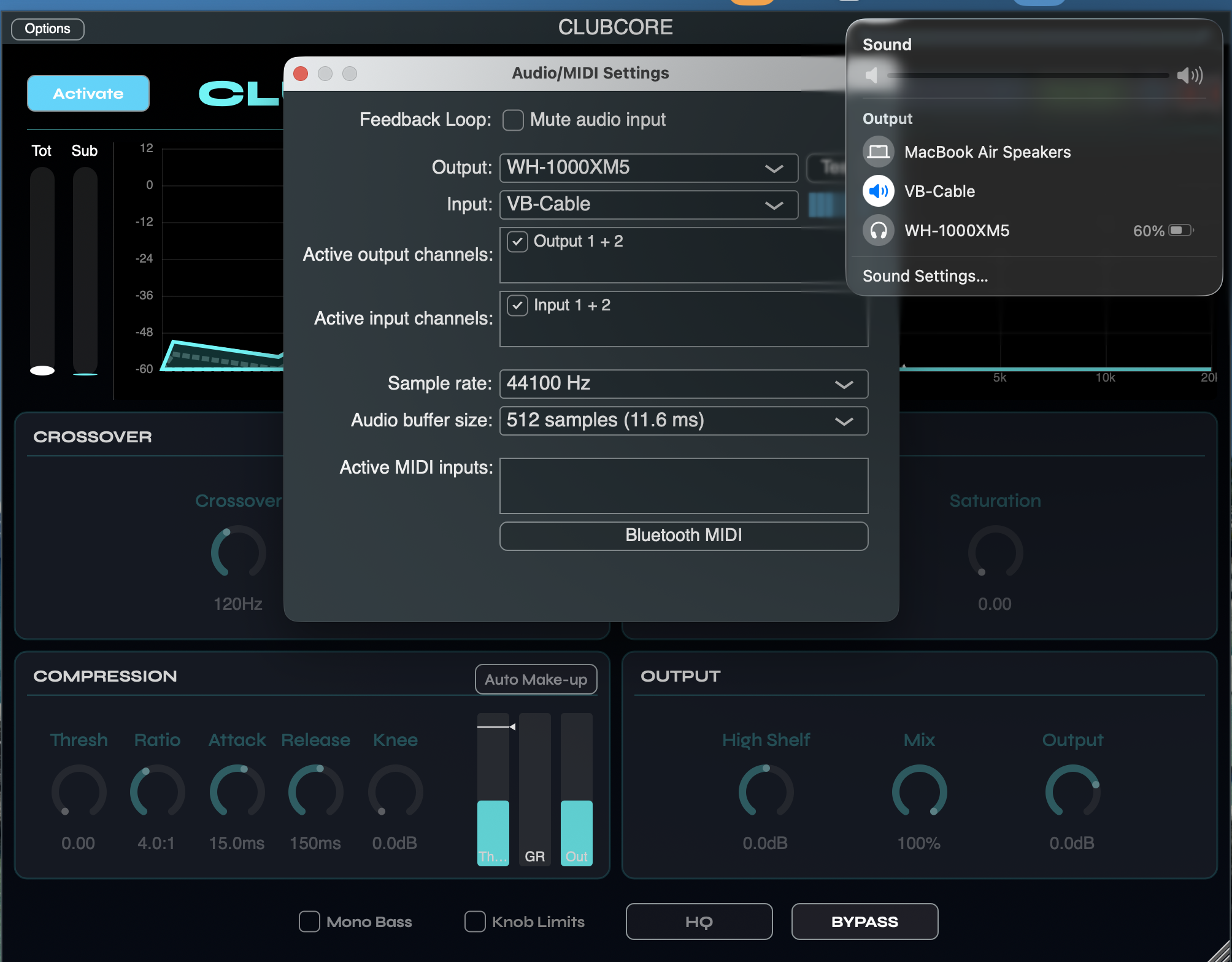
Since DJ software like Rekordbox, Serato, or Traktor doesn't natively support VST/AU plugins, you'll need to route audio virtually. We highly recommend installing the free VB-Audio Virtual Cable.
Hardware Routing
Output the processed sound directly from your computer's audio interface (e.g., using a 3.5mm to Dual RCA cable) straight into a dedicated line-in channel on your hardware DJ Mixer.
Never duplicate the audio routing. Sending your raw DJ signal to the mixer and sending the PC's processed signal to the mixer simultaneously is a fatal mistake. Even a few milliseconds of latency will cause severe phasing and comb-filtering, completely destroying the clean bass punch.
Visual Setup Reference: macOS & Standalone Configuration
This visualization illustrates the complete signal path: routing your DJ software output to the Virtual Cable, capturing it as the Input in CLUBCORE, and finally monitoring the processed low-end through your primary audio interface.